
The debilitating nausea many feel in VR isn’t a technical glitch you have to endure; it’s a physiological response called sensory mismatch. The key to enjoying virtual art isn’t just taking breaks, but actively retraining your brain. This guide provides strategies focused on physiological recalibration, helping you ground your body’s senses to match the visual world and finally explore digital realms without discomfort.
There’s a moment of pure magic when you first step into a virtual museum. You’re standing before Van Gogh’s “Starry Night,” the brushstrokes so vivid you feel you could touch them. Then, it hits. That disorienting lurch in your stomach, a creeping headache, and the cold sweat of motion sickness. The magic shatters, replaced by a desperate need to rip the headset off. For many aspiring virtual tourists, this is a frustratingly common barrier to exploring the incredible world of digital art.
The standard advice often feels inadequate: “take frequent breaks,” “use teleportation,” or “adjust your settings.” While helpful, these are defensive measures that treat the symptom, not the cause. They ask you to limit your experience to avoid discomfort. But what if the solution wasn’t about avoidance, but about adaptation? What if you could train your brain to resolve the conflict that causes the sickness in the first place?
This guide takes a different approach, grounded in VR user experience research and physiology. We’ll explore the root of the problem—a sensory mismatch between your eyes, your inner ear, and your body’s sense of position. More importantly, we’ll shift the focus from passive avoidance to active physiological recalibration. By understanding how to provide your brain with the right “grounding” signals, you can build a tolerance and unlock hours of comfortable, nausea-free exploration in the metaverse’s greatest galleries.
For those who prefer a visual format, the video below demonstrates the kind of intense, first-person movement possible in VR. It highlights exactly why mastering your body’s response to sensory input is so crucial for enjoying more advanced virtual experiences.
To help you navigate this process, we have structured this guide to address every aspect of VR comfort, from choosing the right hardware to understanding the software that can help or hinder your experience. The following sections will provide a comprehensive roadmap to your new, comfortable virtual life.
Summary: Your Roadmap to Nausea-Free VR Exploration
- Quest vs Vive: Which Headset Offers the Best Museum Experience at Home?
- Hygiene in the Metaverse: Are Public VR Headsets Safe to Wear?
- The “Chaperone” Boundary: How to Walk in VR Without Hitting Your Wall?
- Digital Twin: Can VR Replace a Flight to the Pyramids?
- Controllers or Hand Tracking: Which Feels More Natural for Sculpture?
- Screens vs Projectors: How to Display Digital Art in a Physical Gallery?
- When Will Drone Deliveries Replace Couriers in High-Density Zones?
- The Ethics of Digital Resurrection: Should We Buy Tickets to See a Hologram Concert?
Quest vs Vive: Which Headset Offers the Best Museum Experience at Home?
The journey to a comfortable VR experience begins with the hardware itself. A headset that is heavy, poorly balanced, or doesn’t align with your eyes can create physical strain that exacerbates sensory conflict. When choosing a headset for long, contemplative sessions like museum visits, ergonomics are as important as visual fidelity. Weight, weight distribution, and the ability to adjust the interpupillary distance (IPD) are critical factors.
A lighter headset with good weight distribution reduces strain on your neck and face, preventing the low-grade physical discomfort that can prime your body for nausea. The IPD adjustment is even more crucial; if the distance between the lenses doesn’t match the distance between your pupils, your eyes strain to fuse the two images, leading to headaches and disorientation. Modern headsets like the Meta Quest 3 have made significant strides, featuring a much thinner and lighter profile than their predecessors and offering a wide, continuous IPD range.
The following table, based on an in-depth analysis of popular headsets, breaks down key comfort-related features. Pay close attention to the weight and IPD range, as these have a direct physiological impact on your ability to stay immersed comfortably for longer periods.
| Feature | Meta Quest 3 | Quest 3S | HTC Vive |
|---|---|---|---|
| Weight | 515g | 514g | 555g |
| IPD Range | 53-75mm | 3 positions only | 60.8-73.5mm |
| Passthrough Quality | High-res color | Lower resolution | No passthrough |
| Comfort Rating | Good with upgrades | OK-ish stock | Good with Deluxe Audio |
While specifications provide a useful guide, real-world experience is key. For example, a Canadian reviewer recently praised the Quest 3 as ‘the most comfortable VR headset ever worn’, noting its 40% thinner profile compared to the Quest 2. This improved design was found to significantly reduce neck and face strain during extended art viewing sessions, demonstrating that the industry is actively working to solve the physical side of the comfort equation.
Hygiene in the Metaverse: Are Public VR Headsets Safe to Wear?
As VR expands into public spaces like museums, galleries, and arcades, a new concern arises: hygiene. The idea of wearing a device that has been strapped to countless other faces can be unsettling, and it’s a valid consideration. A dirty or sweaty headset isn’t just unpleasant; the anxiety it can create may heighten your sensitivity to motion sickness. Fortunately, established protocols and technologies are in place to ensure public VR is a safe and clean experience.
Most professional venues have a strict hygiene regimen. This typically includes using medical-grade disinfectant wipes on the headset’s facial interface, lenses, and controllers between each user. Furthermore, the industry has developed a range of accessories to address this directly. Disposable sanitary masks, which are worn by the user underneath the headset, provide a simple and effective barrier. Many headsets also feature easily replaceable or cleanable facial interfaces made from non-porous materials like silicone, which don’t absorb sweat or oils.
For high-traffic installations, some venues invest in UV-C cleaning boxes. These devices can sanitize multiple headsets simultaneously in a matter of minutes, using ultraviolet light to kill bacteria and viruses without harsh chemicals. This commitment to cleanliness is crucial for public adoption. It ensures that the only thing a user needs to focus on is the experience itself, not the potential germs left by the person before them.
Ultimately, the safety of a public VR headset comes down to the operator’s diligence. A reputable museum or gallery will make its cleaning procedures transparent. If you’re ever in doubt, don’t hesitate to ask an attendant about their hygiene process. A clean headset provides peace of mind, which is a key, though often overlooked, component of a comfortable virtual experience.
The “Chaperone” Boundary: How to Walk in VR Without Hitting Your Wall?
The core cause of VR sickness is a fundamental disagreement between your senses. Your eyes see movement—walking through a gallery—but your vestibular system (the balance center in your inner ear) and your proprioceptive sense (your body’s awareness of its position) report that you are standing still. This sensory conflict is what makes your brain think it has been poisoned, triggering nausea as a defense mechanism. Research reveals that this is a widespread issue, with some studies showing that 40% to 70% of VR users experience motion sickness after just 15 minutes.
To combat this, VR systems created the “Chaperone” or “Guardian” boundary—a virtual wall that appears when you get too close to physical obstacles. While essential for safety, this system can also be a source of discomfort. As VR comfort research findings suggest, “A tight, constantly visible boundary can create a sense of claustrophobia, which can heighten anxiety and worsen nausea.” The key is to create a boundary system that grounds you without imprisoning you.
One of the most effective ways to achieve this is by creating a physical, tactile boundary in your playspace. This simple trick provides your brain with a constant, subconscious proprioceptive signal about where you are.
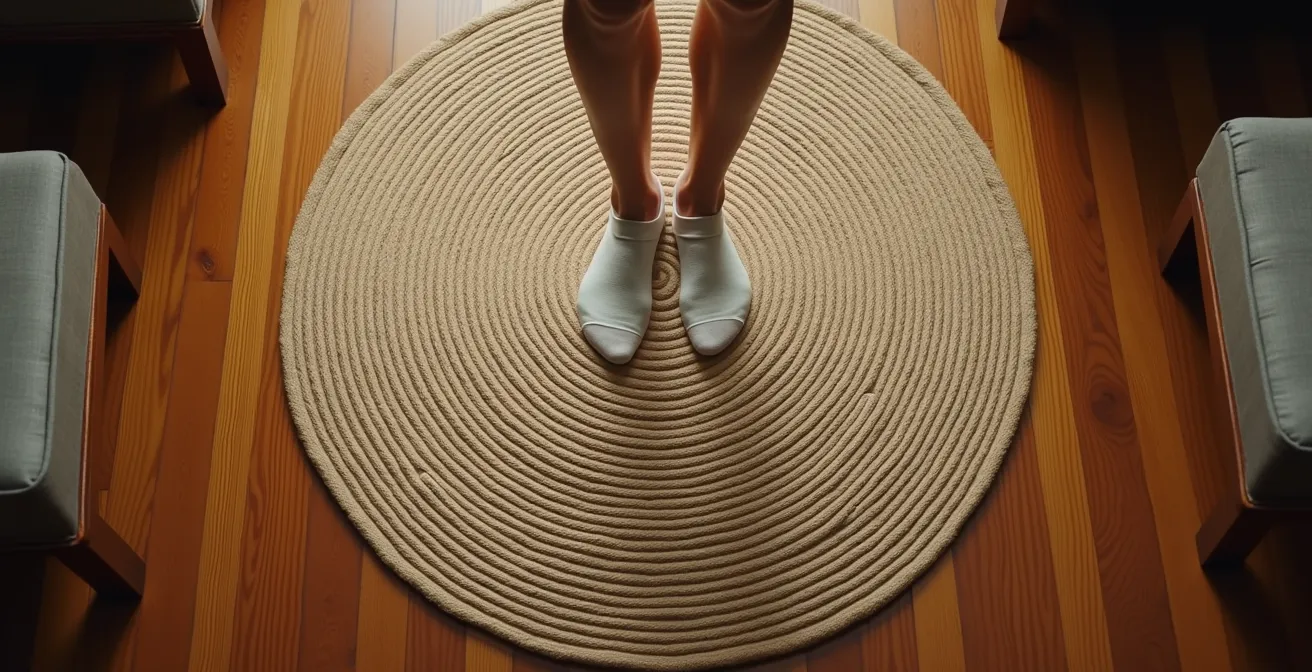
As the image above illustrates, placing a small, textured rug in the center of your VR area is a powerful grounding technique. When your feet feel the edge of the rug, your brain gets a physical cue that corresponds to the virtual boundary, helping to resolve the sensory conflict. This tactile feedback is often more effective and less intrusive than a glowing digital wall, allowing you to stay immersed while remaining safely aware of your physical space.
Digital Twin: Can VR Replace a Flight to the Pyramids?
The ultimate promise of virtual art and tourism is the “digital twin”—a perfectly replicated virtual version of a real-world place, like the Louvre or the Giza Plateau, that you can explore from home. The idea is to trick your brain into feeling true “presence.” However, this is where the physiological challenges become most acute. For the brain to accept a virtual world, the simulation must be flawless, particularly in its delivery of visual information.
Your brain is an incredibly sensitive motion-detection machine. Studies on VR sickness indicate that to avoid sensory conflict, the brain processes visual information at 90 frames per second minimum. If the frame rate of a VR experience drops below this threshold, even for a moment, your brain detects a micro-stutter that your conscious mind might not even notice. This flicker is enough to break the illusion of smooth motion, creating a jarring mismatch with your vestibular system’s perception of stability.
This is why a powerful PC or a well-optimized standalone headset is critical. A digital twin of the Pyramids that runs at a choppy 60 frames per second will be far more nauseating than a simpler, cartoonish world that runs at a perfectly stable 90 or 120 fps. The brain prioritizes smoothness and consistency over photorealism. When exploring a digital twin, if you start to feel unwell, it is often a sign that the application is struggling to maintain a consistent high frame rate.
Recognizing this challenge, platforms are developing tools to help users. For instance, Meta’s comfort rating system now categorizes virtual tourism apps. Experiences with stationary viewpoints are rated ‘Comfortable,’ while those with artificial movement (like a virtual walking tour) are rated ‘Moderate.’ This helps users, especially those with physical limitations in countries like Canada or elsewhere, to choose appropriate virtual travel alternatives that are less likely to trigger sensory conflict.
Controllers or Hand Tracking: Which Feels More Natural for Sculpture?
When interacting with virtual art, especially in a creative capacity like sculpting, the method of input can dramatically affect your sense of presence and comfort. Using physical controllers means your brain has to manage an abstraction: you press a button, and a virtual tool moves. Your real hands are clenched around a piece of plastic, while your virtual hands are floating in space. This disconnect can contribute to the overall sensory dissonance.
This is where controller-free hand tracking becomes a powerful tool for physiological grounding. By using cameras to track your actual hands and render them in VR, the gap between your physical self and your virtual self narrows significantly. When you reach out to touch a virtual sculpture, your real arm is in the same position as your virtual arm. This alignment is a crucial piece of proprioceptive data for your brain.

This natural interaction doesn’t just feel more intuitive; it can actively reduce nausea. As the VR Input Research Team at Gravity Sketch explains, “Hand tracking, by aligning virtual and real hand positions, can reduce sensory conflict and provide a more grounding, less nauseating experience than ‘floating’ controllers.” This proprioceptive feedback—the sense of your body in space—acts as an anchor, reassuring your brain that the virtual world is aligned with your physical one. Seeing your own hands move as you expect them to is one of the strongest grounding signals available in VR.
Action Plan: Mastering Hand Tracking for Comfort
- Ensure adequate lighting: While some new headsets like the Quest 3S work in darkness, most hand tracking systems perform best in well-lit rooms.
- Start with simple gestures: Begin by opening and closing your hands or turning your palms over before attempting complex sculpting movements.
- Use the ‘pinch’ gesture for selection: This is often more reliable and causes less arm fatigue than pointing at objects for long periods.
- Take breaks every 20-30 minutes: Even without controllers, holding your arms up can cause proprioceptive fatigue, so rest is still important.
- Consider a hybrid approach: Use controllers for actions requiring high precision or button inputs, and switch to hands for broader, more expressive shaping.
Screens vs Projectors: How to Display Digital Art in a Physical Gallery?
The challenge of motion sickness isn’t limited to at-home users; it’s a major hurdle for museums and galleries wanting to incorporate VR. Handing every visitor a headset is not only a logistical and financial challenge but also excludes a significant portion of the audience who are sensitive to VR sickness or simply don’t want to wear a headset. The solution lies in shifting from an individual experience to a shared one.
Instead of isolating each person in a virtual world, successful galleries are creating inclusive installations using spectator screens. In this model, one person uses the VR headset to navigate the digital artwork, while their perspective is broadcast onto large screens or projections for a group to watch. This approach brilliantly solves several problems at once. The group shares a communal experience, discussing the art together, while only one person is exposed to the potential for motion sickness. As a case study on VR in museums from AMT Lab notes, this setup allows for inclusive experiences for those with motion sensitivity.
This model opens the door to other technologies that prioritize group comfort over individual immersion. Projection mapping, which projects art onto the gallery’s physical walls, and large-scale LED walls offer a highly social and completely nausea-free way to experience digital art. While they may lack the first-person “presence” of VR, they excel in accessibility and shared experience, ensuring that no visitor is left behind due to physiological intolerance.
For curators, the choice of display technology becomes a strategic decision balancing immersion, cost, and inclusivity. A VR headset offers the highest level of individual presence but carries the highest risk of motion sickness and is the least social. In contrast, projection mapping has virtually zero risk of motion sickness and can accommodate an unlimited group size, making it a far more accessible choice for public installations.
When Will Drone Deliveries Replace Couriers in High-Density Zones?
At first glance, the logistical challenges of drone delivery seem unrelated to the physiological experience of VR. Yet, they share a common conceptual hurdle: the “last inch problem.” A drone can fly a package miles across a city with ease, but the final, delicate task of placing it safely on a specific apartment balcony is immensely complex. Similarly, VR can create breathtakingly vast and realistic worlds, but it struggles with the “last inch” of perfectly tricking the human senses.
This gap between the simulation and our body’s perception is the very source of motion sickness. As one technology integration analysis puts it, “Just as drones struggle with doorstep delivery, VR struggles with perfectly tricking the senses – both face a ‘last inch problem’ in achieving seamless integration.” The slightest inconsistency—a minor drop in frame rate, a subtle lag in head tracking, or a disconnect between physical and virtual movement—is where the illusion breaks down and discomfort begins.
This persistent challenge has a real impact on the technology’s adoption. Just as regulatory and logistical hurdles have slowed the rollout of drone delivery, the unresolved issue of motion sickness remains a significant barrier for VR. Overcoming it isn’t just about user comfort; it’s about the fundamental viability and growth of the medium. The industry cannot reach its full potential if a large percentage of potential users feel physically ill after a few minutes of use.
Solving this “last inch problem” is the holy grail of VR development. It requires a holistic approach that combines better hardware ergonomics, flawless software optimization, and, most importantly, applications designed from the ground up with a deep understanding of human physiology. It’s about closing the gap between the virtual and the real, one sense at a time.
Key Takeaways
- The root cause of VR sickness is a sensory conflict between your eyes, inner ear, and body position awareness.
- The solution is not just avoidance, but active physiological recalibration by providing your brain with “grounding” signals.
- Hardware choices (weight, IPD), software performance (90fps+), and interaction methods (hand tracking) all play a critical role in reducing sensory mismatch.
The Ethics of Digital Resurrection: Should We Buy Tickets to See a Hologram Concert?
While much of this guide focuses on making headset-based VR more comfortable, a parallel solution is emerging: creating immersive experiences that bypass the headset entirely. The debate around the digital resurrection of deceased artists, exemplified by hologram concerts, provides an interesting case study. While the ethical questions are complex, the technology points toward a future of accessible, nausea-free digital entertainment.
The groundbreaking ABBA Voyage experience in London is a prime example. It uses incredibly sophisticated projection technology and a custom-built arena to create the illusion of the band performing live. The audience experiences a deeply immersive, emotional, and communal concert without a single VR headset in sight. Consequently, the problem of motion sickness is completely eliminated. This model proves that “presence” and immersion are not exclusive to virtual reality.
This approach offers a powerful alternative for experiencing digital art and performance. By taking the experience out of the individual headset and placing it into a shared physical space, it becomes accessible to everyone, regardless of their sensitivity to sensory conflict. It solves the problem not by fixing the user’s reaction to VR, but by changing the medium itself.
As we look to the future, we will likely see a diversification of immersive technologies. VR headsets will continue to offer the deepest level of first-person immersion for those who can tolerate it. Simultaneously, headset-free experiences like ABBA Voyage will provide stunningly realistic and comfortable shared events. For the art world, this means a broader palette of tools to engage audiences, ensuring that digital creativity can be enjoyed by all, without the physical side effects.
Now that you understand the principles of VR comfort and the strategies to achieve it, the next step is to put them into practice. Choose a highly-rated “Comfortable” experience from a digital store and consciously apply these grounding techniques to begin training your brain for a new, nausea-free relationship with the virtual world.